.svg)
Windows 11 for Business: Pro vs Enterprise, Key Features & Upgrade Guide
Upgrading your company’s devices is a big decision, especially when it comes to choosing the right operating system. This blog will help you understand Windows 11 for business, compare Windows 11 Pro and other editions, and explain how each option fits different business needs. You’ll also learn about licensing, security features, and what to expect if you’re moving from Windows 10. We’ll cover practical steps, common challenges, and best practices for a smooth upgrade, plus how tools like Microsoft 365 and Microsoft Endpoint Manager can support your transition.
What you need to know about Windows 11 for business
Windows 11 for business is designed to help organisations work smarter, safer, and more efficiently. It builds on the strengths of Windows 10, but adds new features and improvements that matter for modern businesses. If you’re thinking about upgrading to Windows 11, it’s important to know how it can support your team and protect your data.
With different editions like Windows 11 Pro and Windows 11 Enterprise, you can choose the right version for your company’s size and needs. Each edition comes with its own set of tools, security features, and management options. Understanding these differences will help you make the best choice for your business.

Key considerations when choosing a Windows 11 edition for your business
Selecting the right Windows 11 edition is crucial for meeting your business goals. Here are some important factors to consider:
Business need #1: Security requirements
If your company handles sensitive data, you’ll want advanced security features. Windows 11 Pro and Enterprise both offer strong protection, but Enterprise includes extra controls for larger organisations.
Business need #2: Device management
Managing many devices is easier with the right tools. Windows 11 Enterprise supports advanced management through Microsoft Endpoint Manager, making it simple to update and secure all your endpoints.
Business need #3: Licensing and costs
Licensing can affect your budget. Windows 11 Pro is often a one-time purchase, while Enterprise usually comes as part of a subscription, which may include other services like Microsoft 365.
Business need #4: Compatibility with existing software
Before upgrading to Windows 11, check that your current business applications will work smoothly. Some older programmes may need updates or replacements.
Business need #5: Support for remote work
If your team works from different locations, features like Windows Autopilot and Microsoft Teams integration can make setup and collaboration easier.
Business need #6: Compliance and regulations
Certain industries require strict data protection. Windows 11 Enterprise offers more options for setting security policies and meeting compliance standards.
Business need #7: Upgrade timeline
Plan your upgrade to avoid disruption. Consider how long support for Windows 10 will last and when you’ll need to move to Windows 11.
Essential features of Windows 11 for business
Here are some of the most important features that make Windows 11 a strong choice for businesses:
- Enhanced security with Windows Defender and Windows Hello for safer logins.
- Streamlined device setup using Windows Autopilot.
- Improved collaboration with built-in Microsoft Teams.
- Centralised updates and controls through Windows Update for Business.
- Support for advanced security policies and information protection.
- Modern user interface for better productivity and ease of use.

How Windows 11 Pro vs. Enterprise affects your upgrade decision
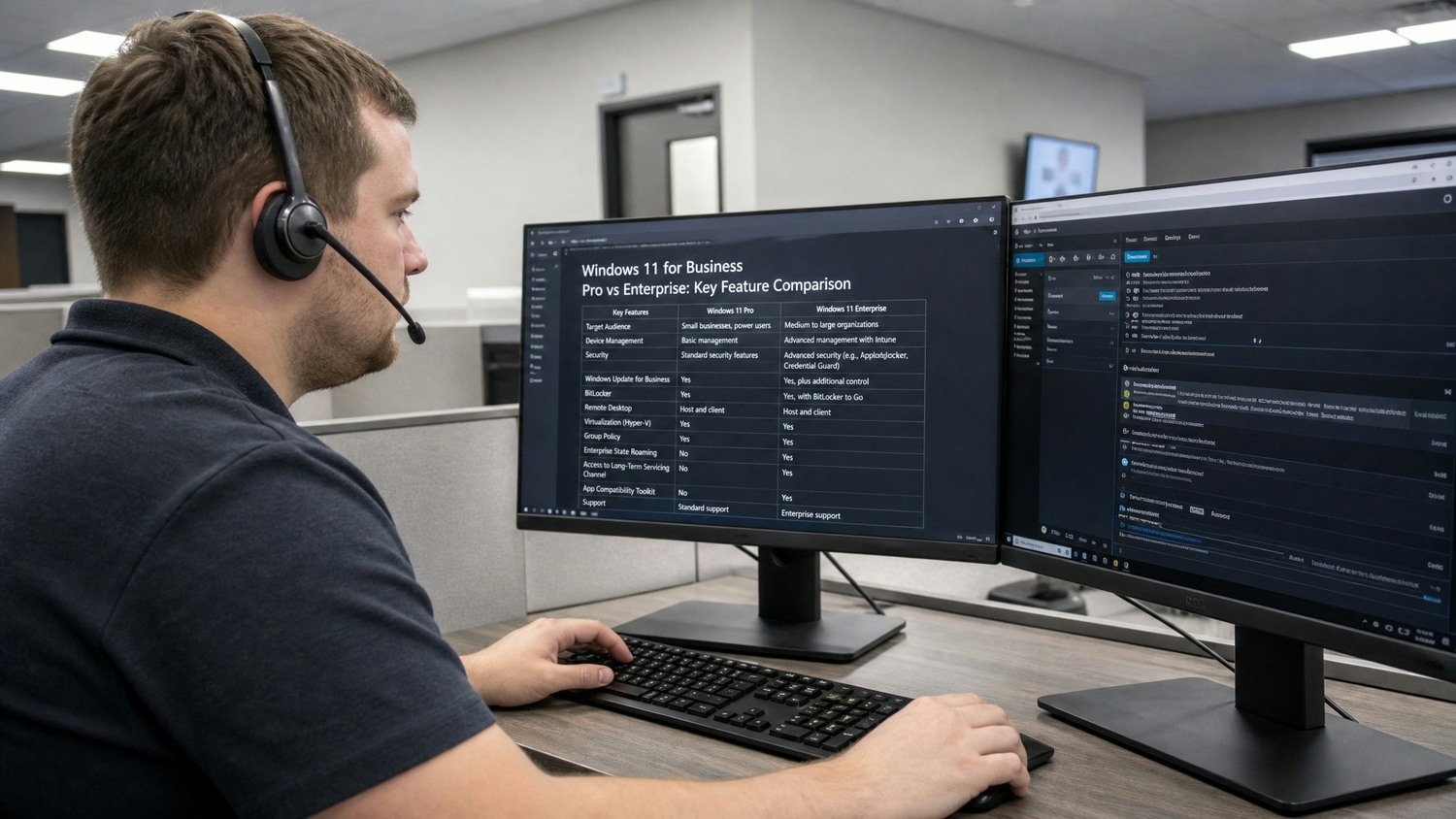
Choosing between Windows 11 Pro and Enterprise can impact how your business operates. Windows 11 Pro is suitable for small to medium-sized companies that need reliable security and basic management tools. It covers most business needs, including BitLocker encryption and remote desktop access.
Windows 11 Enterprise, on the other hand, is built for larger organisations or those with complex IT requirements. It includes all the features of Pro, plus advanced options like device control, application management, and deeper integration with Microsoft Endpoint Manager. Enterprise licensing often comes as part of a broader agreement, which can include Microsoft 365 and other services.
If your business is growing or you need more control over devices and data, Enterprise may be the better fit. However, for many companies, Pro offers a balance of security and simplicity at a lower cost.
Key differences between Windows 11 editions: What you need to know
Understanding the main differences between Windows 11 editions will help you pick the right one. Here’s a closer look at what sets them apart:
Difference #1: Security features
Windows 11 Enterprise includes advanced security options like Windows Information Protection and enhanced threat detection, while Pro offers strong but more basic protection.
Difference #2: Device management
Enterprise supports more detailed device management, including group policies and remote deployment, making it easier to manage large fleets of devices.
Difference #3: Licensing models
Pro is usually a one-off license, while Enterprise is often subscription-based and may include extra services like Microsoft 365.
Difference #4: Update controls
Enterprise users get more control over Windows Update schedules and policies, which is helpful for minimising downtime during business hours.
Difference #5: Application access
Enterprise allows for more granular control over which apps can be installed or run, supporting stricter security policies.
Difference #6: Support and training
Enterprise customers often receive priority support and access to resources like Microsoft Learn for staff training.
Difference #7: Compliance tools
Enterprise editions include extra compliance tools, which are useful for businesses in regulated industries.
Practical steps for upgrading to Windows 11 for business
Moving to Windows 11 for business is a process that requires planning. Start by reviewing your current devices and making sure they meet the hardware requirements for the new operating system. Next, check that your business-critical applications are compatible with Windows 11.
It’s a good idea to test the upgrade on a small group of devices first. This helps you spot any issues before rolling out the update across your company. Use tools like Windows Update for Business and Microsoft Endpoint Manager to manage the process and keep everything running smoothly. Don’t forget to back up important data before you begin.
Best practices for a smooth Windows 11 business upgrade
Follow these tips to make your upgrade as easy as possible:
- Communicate the upgrade plan to your team in advance.
- Test Windows 11 on a few devices before a full rollout.
- Use Windows Autopilot for faster device setup and deployment.
- Keep security policies up to date during and after the upgrade.
- Provide training using resources like Microsoft Learn.
- Monitor updates and address any issues quickly.
A little preparation goes a long way in avoiding common problems.
How Sonar IT can help with Windows 11 for usiness
Are you a business managing 15-40 endpoints and wondering which Windows 11 edition is right for you? If your company is growing and needs reliable systems, security, and easy management, our team can guide you through every step of upgrading to Windows 11.
We help businesses choose the best edition, handle licensing, and set up advanced security features. With our support, you can focus on your business while we make sure your IT is secure, compliant, and ready for the future. Contact us today to get started.
Frequently asked questions
What is the main difference between Windows 11 Pro and Windows 11 Enterprise?
Windows 11 Pro is designed for small to medium businesses needing strong security and essential management tools. Windows 11 Enterprise adds advanced security features, more control over devices, and extra management options for larger organisations. If your business needs more detailed control and compliance, Enterprise is often the better choice.
Both editions require a valid license, but Enterprise is usually part of a subscription that can include Microsoft 365. Consider your company’s size and business needs when choosing between them.
How do I know which Windows 11 edition is best for my business?
Start by reviewing your business needs, including security, device management, and compliance requirements. Windows 11 Pro covers most needs for smaller companies, while Enterprise is built for businesses that need advanced features and more granular control. Think about your current IT setup and plans before deciding.
Check if your existing devices meet the requirements for the edition you want. You can also use Microsoft Endpoint Manager to help manage upgrades and deployments.
What happens when support for Windows 10 ends?
When support for Windows 10 ends, your devices will no longer receive security updates or technical assistance from Microsoft. This can leave your business exposed to risks and compliance issues. Planning your upgrade to Windows 11 for business early helps you avoid these problems.
Start by checking which devices are eligible to upgrade to Windows 11. Use Windows Update for Business to manage the transition smoothly and keep your systems secure.
Are there any new features in Windows 11 that help with security?
Yes, Windows 11 introduces several new features focused on advanced security. These include improved Windows Defender, Windows Hello for passwordless sign-ins, and Windows Information Protection to keep sensitive data safe. These tools help protect against modern threats and make compliance easier.
You can also use security policies to set rules for devices and users. Regular updates through Windows Update keep your systems protected.
How does Windows 11 support remote work and device deployment?
Windows 11 for business supports remote work with built-in Microsoft Teams integration and easy device setup using Windows Autopilot. These features make it simple for employees to stay connected and productive from anywhere.
Device management is streamlined with Microsoft Endpoint Manager, allowing IT teams to deploy updates and manage security settings remotely. This is especially helpful for businesses with multiple locations or remote staff.
What resources are available for training and support during the upgrade?
Microsoft Learn offers free training modules to help your team get comfortable with Windows 11 and its features. You can find step-by-step guides, videos, and practical tips for both users and IT staff.
For ongoing support, consider working with a partner like Sonar IT. We can help you plan, deploy, and manage your upgrade, ensuring a smooth transition for your business.




%20(1)%20(1).avif)


